
Affiliate Program FAQs
How does the affiliate program work?
To be an affiliate, one does not need to be a Member of the site to join as an Affiliate and start refer.
Generated referral share links can be accessed in the Affiliate Portal. These share links will redirect to any URL, Landing Page, or Checkout Page.
These Share Links install a cookie onto prospective customer's browsers for 30 days or until the cache is cleared.
The installed cookie allows your Affiliate Marketing System to track views and conversions on your site to automatically calculate and credit Affiliate commission. This can be viewed in the Affiliated Portal.
The Affiliate User is then credited with a percentage of each sale made through their Share Link. As long as the purchase is made within 30 days on the same browser the Share Link was clicked, the Affiliate will be credited with the transaction.
Affiliates can begin marketing Offers with the generated Share Links through various marketing channels by simply sharing the links available in their Affiliate Portal.
New Affiliates will receive the Affiliate User Welcome email sent by your site containing their Login information to access the Share Links in their Portal and a link to the Affiliate Login Page.
How long do cookies last for an Affiliate link?
Cookies will remain in a customer's browser for at least 30 days after clicking an Affiliate link.
If your customer purchases an Offer during this time period, the Affiliate will be credited with the referral.
Cookies can potentially last up to 90 days unless they click another affiliate's link before making their purchase.
If your customer clicks another Affiliate's link before making their purchase, the Affiliate with the most recent link clicked will be credited for the referral.
What if the offer is a subscription?
If the Offer is a Subscription, the Affiliate commission is set for the lifetime of that Member's subscription.
For example, if a Member purchases a monthly subscription Offer and pays each month, your Affiliate(s) will be credited for a monthly commission for the Member's lifetime each month the Member continues to pay.
What does your affiliate dashboard look like?
The Affiliates Dashboard shows an overview of how your Affiliates are performing:
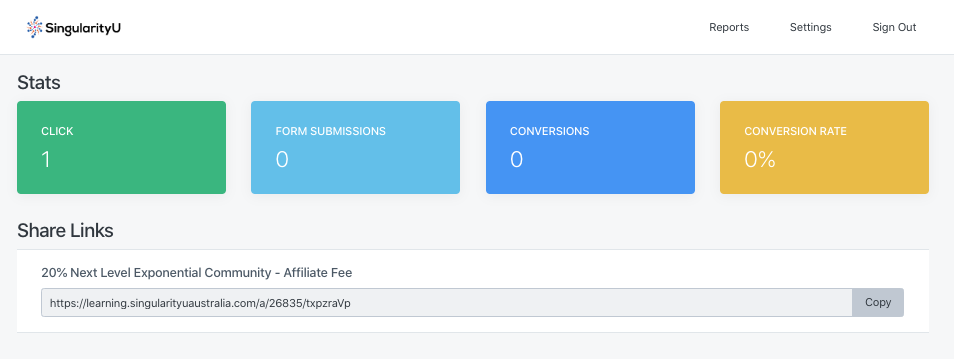
- Clicks: The total number of clicks on all Affiliate Share Links.
- Form Submissions: The number of opt-ins tracked through your Affiliate Share Links.
- Conversions: The total number of Offer purchases tracked through all of your Affiliate Share Links.
- Conversion Rate: Overall conversions divided by overall clicks.
Does my Affiliate's commission reflect the discounted price or the original price when a coupon code is applied?
If an Affiliate's link is used to purchase an Offer with a coupon code, an Affiliate will be credited based on the discounted price after the coupon code is applied.
A few reasons the affiliate credit could have been misplaced:
- The purchaser did not buy within 30 days of clicking the Share Link.
- The purchaser used a different browser or device from the browser or device used when the Share Link was clicked.
- The customer clicked a different Affiliate's Share Link (this overrides the initial link) before purchase.
- The Offer purchased is not set to Give an affiliate commission.
How often are Affiliate Commissions paid?
Affiliate commissions are paid at the end of each month via paypal email.
How do I receive money through PayPal?
With PayPal, you receive money when someone sends a payment to your email address or mobile number. Once that happens, we’ll send you a message letting you know you have money available.
You can access your money from your PayPal Cash account or PayPal Cash Plus account by going to the Summary page. You can then choose to:
- Transfer the funds to your bank account, or
- Keep the funds in your PayPal account and use your available balance to send money to friends and family or to shop online
To accept the money, you’ll need to open a PayPal account and confirm your email address.
